When Two Laravel Inertia Apps Share a Server: The Hidden SSR Port Collision Bug

When Two Laravel Inertia Apps Share a Server: The Hidden SSR Port Collision Bug
You have two separate Laravel Inertia React applications, both live, both running on the same server behind Cloudflare DNS. Everything seems fine — until you notice something unsettling.
You're on /billing in App B, and you hit refresh. Suddenly the sidebar menu looks like it belongs to App A. Navigate to a unique route like /app-b-only-page, and everything snaps back to normal. Refresh again on /billing... App A's menu returns like a ghost.
This isn't a Cloudflare caching issue. It isn't a React hydration glitch. It's something far more architectural — a silent SSR port collision between your two apps.
Understanding the Setup
Let's map out what's happening before we diagnose the bug.
App A — full SSR enabled, running on the default Inertia SSR port (13714).
App B — SSR not actively running, but its vite.config.js and config/inertia.php still reference the SSR port. The SSR Node process was never started for App B.
Both apps are served by Nginx (or Apache) on the same machine, with Cloudflare in front handling DNS.
The Root Cause: Ghost SSR Port Reference
When a Laravel Inertia app has SSR enabled in its config, PHP asks the SSR Node server for a pre-rendered HTML response on every page load. It makes an HTTP request to http://127.0.0.1:13714 (the default port).
Here's the critical part:
App B's config/inertia.php:
'ssr' => [
    'enabled' => true,
    'url' => 'http://127.0.0.1:13714',
],
App B's vite.config.js:
export default defineConfig({
  plugins: [
    laravel({ input: 'resources/js/app.jsx', ssr: 'resources/js/ssr.jsx' }),
    react(),
  ],
  ssr: {
    noExternal: ['@inertiajs/react'],
  },
});
App B has the SSR config wired up — but the actual SSR Node process (node bootstrap/ssr/ssr.js) was never started for App B.
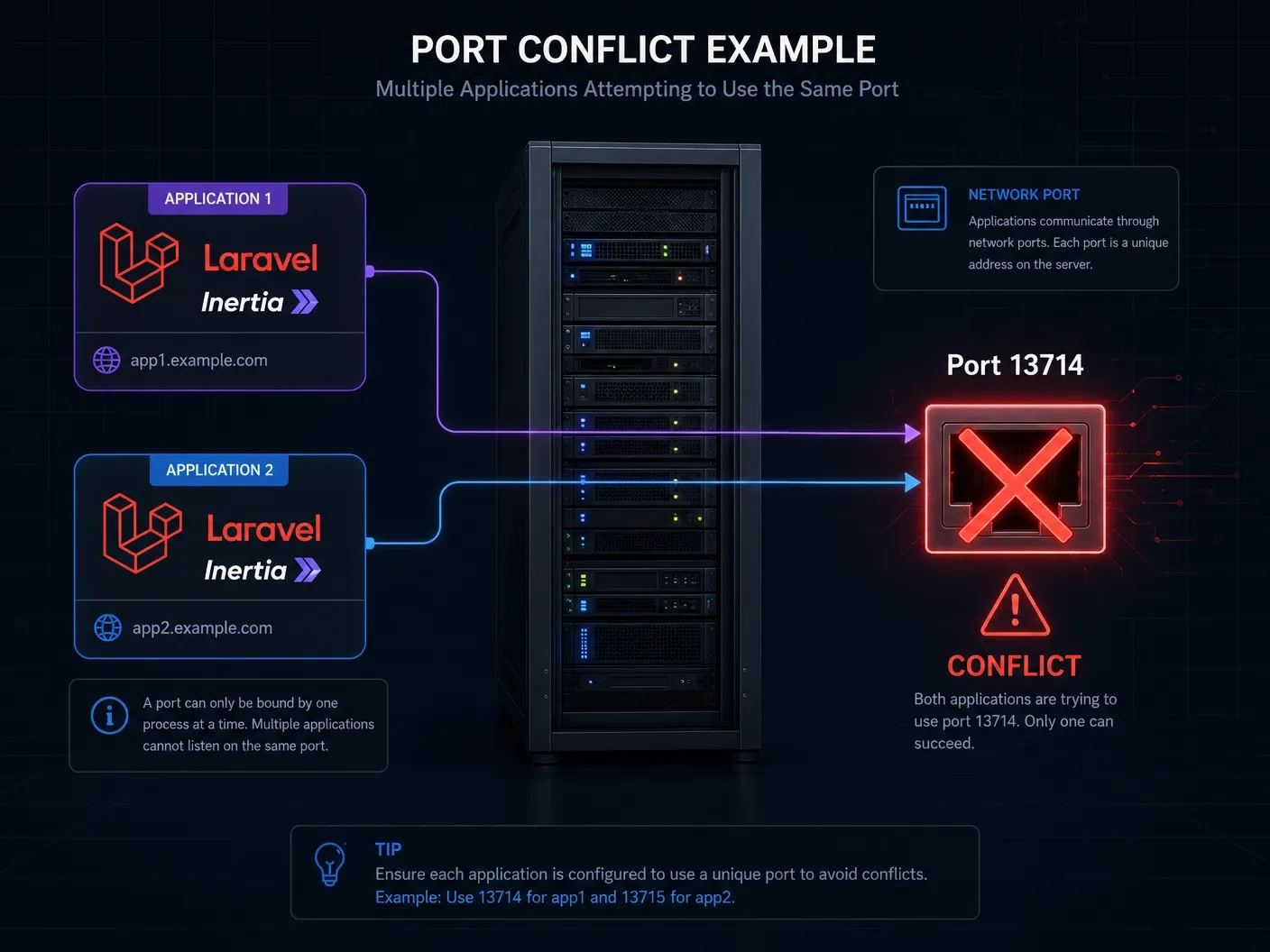
So when App B receives a request for /billing, it tries to reach its SSR server at http://127.0.0.1:13714. That port is occupied, but not by App B's SSR process — it's App A's SSR server sitting there.
App A's SSR server dutifully renders a response. It doesn't know it's serving the wrong app. It just renders what it has — App A's component tree, App A's menus, App A's layout.
App B's PHP receives App A's HTML and sends it to the browser as if it were its own.
Why Only Shared Slugs?
This is the subtle part that makes the bug so confusing.
When the SSR server renders /billing, it returns whatever App A has for that route. If App B also has a /billing route (which it does — that's why this page was requested), the mismatch is invisible at first glance. You see a billing page. Just with the wrong sidebar.
But when you navigate to /team-dashboard — a route that only exists in App B — App A's SSR server either:
- Returns a 404 / empty render, causing Inertia to fall back to client-side rendering (CSR), which correctly uses App B's assets.
- Or the SSR response fails silently and Inertia falls back again.
In fallback/CSR mode, React boots up from App B's own JavaScript bundle and renders the correct component tree. The menus snap back to normal.
Shared slug → SSR response from wrong app → wrong menus.
Unique slug → SSR failure/fallback → correct CSR render → correct menus.
Visualizing the Request Flow
Browser requests /billing on App B
         │
         ▼
   Nginx routes to App B (PHP-FPM)
         │
         ▼
   App B's HandleInertiaRequests runs
         │
         ▼
   config/inertia.php says SSR enabled → call http://127.0.0.1:13714
         │
         ▼
   Port 13714 is occupied by App A's SSR process ← THE BUG
         │
         ▼
   App A's SSR server renders /billing using App A's component tree
         │
         ▼
   App B sends App A's HTML to browser ← Wrong menus rendered
         │
         ▼
   React hydration runs against App B's JS bundle
         │
         ▼
   Hydration mismatch or partial correct render on client
The Fix: Three Approaches
Option 1 — Disable SSR in App B (Quickest Fix)
If App B doesn't actually need SSR, the simplest fix is to disable it cleanly:
config/inertia.php in App B:
'ssr' => [
    'enabled' => false,
],
vite.config.js in App B — remove the ssr entry entirely:
export default defineConfig({
  plugins: [
    laravel({ input: 'resources/js/app.jsx' }), // remove ssr: 'resources/js/ssr.jsx'
    react(),
  ],
  // remove the ssr block entirely
});
This ensures App B never attempts to reach an SSR server. All rendering falls back to CSR, and no cross-app collision can occur.
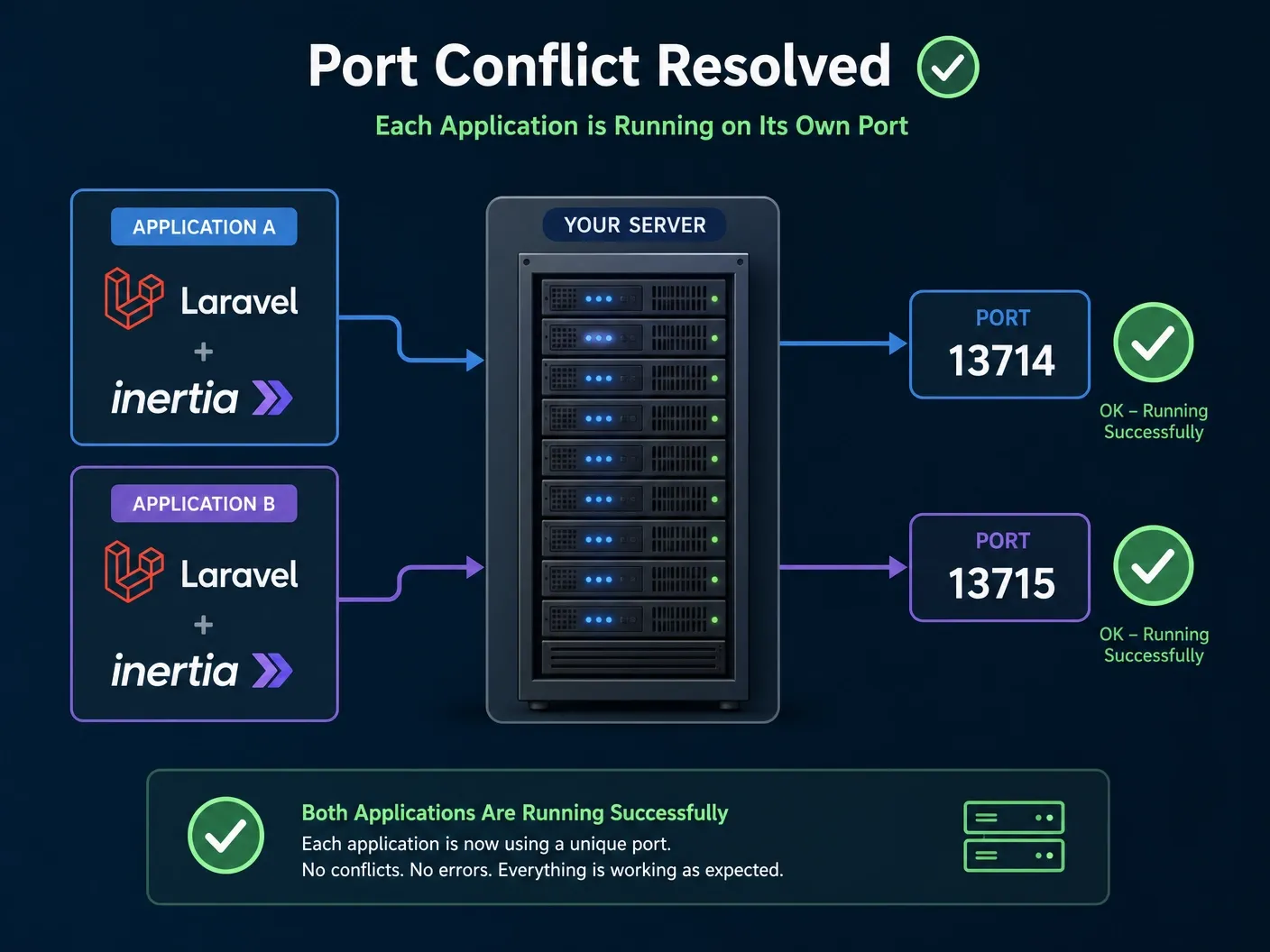
Option 2 — Run App B's SSR on a Different Port (If You Need SSR)
If App B legitimately needs SSR, give it its own port.
config/inertia.php in App B:
'ssr' => [
    'enabled' => true,
    'url' => 'http://127.0.0.1:13715', // different port
],
vite.config.js in App B:
export default defineConfig({
  plugins: [
    laravel({ input: 'resources/js/app.jsx', ssr: 'resources/js/ssr.jsx' }),
    react(),
  ],
  server: {
    hmr: { host: 'localhost' },
  },
  ssr: {
    noExternal: ['@inertiajs/react'],
  },
});
Then start App B's SSR process on the new port:
# App B's SSR start command
node bootstrap/ssr/ssr.js --port=13715
Update your process manager (Supervisor, PM2, or systemd) to run both SSR processes:
# /etc/supervisor/conf.d/app-a-ssr.conf
[program:app-a-ssr]
command=node /var/www/app-a/bootstrap/ssr/ssr.js
directory=/var/www/app-a
autostart=true
autorestart=true

# /etc/supervisor/conf.d/app-b-ssr.conf
[program:app-b-ssr]
command=node /var/www/app-b/bootstrap/ssr/ssr.js --port=13715
directory=/var/www/app-b
autostart=true
autorestart=true
Option 3 — Nginx-Level Isolation (Belt and Suspenders)
Even with different ports, add explicit environment separation in your Nginx config to make the intent self-documenting:
# App A
server {
    server_name app-a.example.com;
    location / {
        fastcgi_param APP_SSR_PORT 13714;
        # ... rest of config
    }
}

# App B
server {
    server_name app-b.example.com;
    location / {
        fastcgi_param APP_SSR_PORT 13715;
        # ... rest of config
    }
}
And read this in each app's config/inertia.php:
'ssr' => [
    'enabled' => env('INERTIA_SSR_ENABLED', false),
    'url' => 'http://127.0.0.1:' . env('INERTIA_SSR_PORT', 13714),
],
With .env per app:
# App A .env
INERTIA_SSR_ENABLED=true
INERTIA_SSR_PORT=13714

# App B .env
INERTIA_SSR_ENABLED=false
INERTIA_SSR_PORT=13715
How to Confirm the Bug Before Fixing
Before applying any fix, verify this is indeed the issue:
# Check what's listening on the default SSR port
sudo ss -tlnp | grep 13714

# Confirm which process owns it
sudo lsof -i :13714

# Manually test App B's SSR call
curl http://127.0.0.1:13714/billing
# If you see App A's HTML here, the collision is confirmed
If the curl output returns HTML containing App A's component structure, the diagnosis is confirmed.
Lessons Learned
This bug teaches a few important things about running multi-app setups:
1. Config presence ≠ process running. Having SSR configured in vite.config.js and inertia.php doesn't mean the SSR process is active. It just means PHP will try to reach it — and will happily talk to whatever is listening on that port.
2. Default ports are shared resources. Port 13714 is Inertia's default, and it's just a number on your server. Two apps with the same default will collide.
3. Silent failures are the worst failures. Inertia doesn't throw a 500 error when the SSR response comes from a different app. It renders what it receives. The bug masquerades as a layout glitch for weeks before you trace it.
4. Always use .env for SSR port configuration. Hard-coding ports in config files is asking for exactly this kind of cross-app bleed.
5. Validate your multi-app setup with unique routes first. If an identical slug renders differently on hard refresh vs. soft navigation, SSR is the first suspect.
Quick Reference Checklist
When deploying multiple Inertia apps on one server:
- Each app that uses SSR has a unique port in its
.envandconfig/inertia.php - Apps that don't use SSR have
INERTIA_SSR_ENABLED=false - The SSR Node process is actually running for every app with SSR enabled
- Process manager (Supervisor/PM2) has a separate entry per SSR process
-
vite.config.jsSSR entry is removed for non-SSR apps - After deploy, verify with
curl http://127.0.0.1:<port>/<shared-slug>per app
Final Thoughts
The beauty — and the danger — of Inertia.js SSR is that it's nearly invisible when it works. When two apps quietly share a port, it's equally invisible in its failure. The page loads. The route matches. Only the wrong sidebar gives it away.
If you're running multiple Inertia apps on one server, audit your SSR port assignments today. It takes five minutes and saves hours of debugging a ghost.